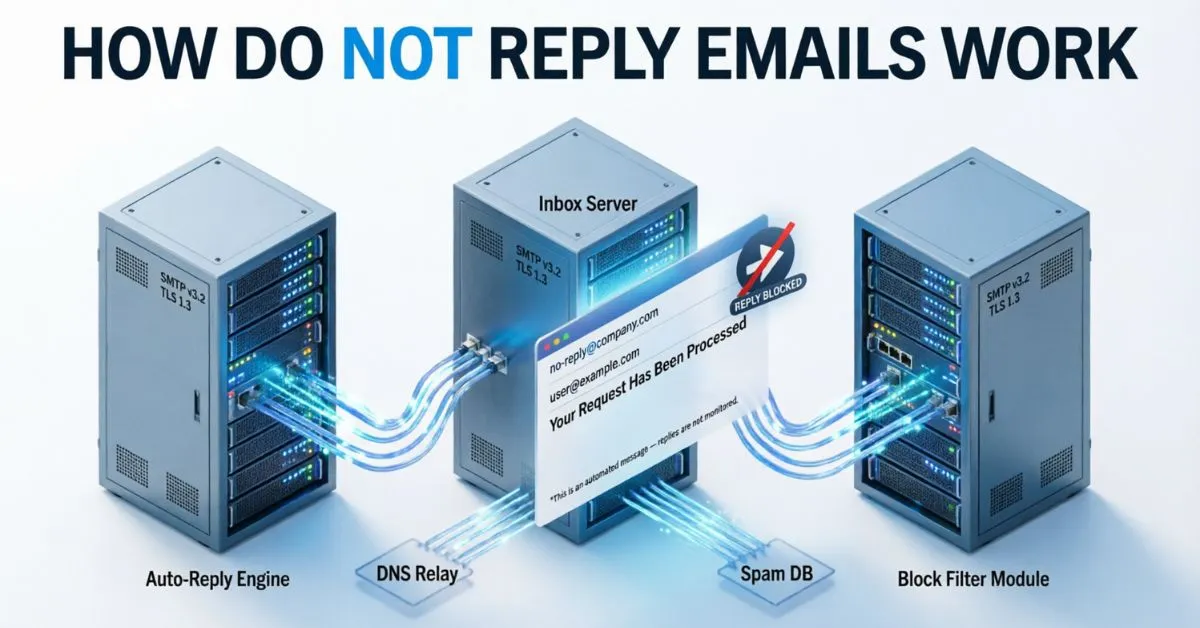
How Do Not Reply Emails Work was a question I found myself asking after a frustrating experience. I had received an important email from a company and quickly sent a reply, expecting to get help.
Hours later, I noticed that my message had never reached anyone. I was confused and wondered what had gone wrong. After looking into it, I discovered that many businesses use “noreply” email addresses that are designed to send messages but not receive responses.
Once I understood how this system worked, everything started to make sense. If you’ve ever tried replying to an email and received no response, I know exactly how that feels because I’ve been there too.
In this guide, I’ll explain how do not reply emails work, why companies use them, and what you should do when you need to contact a real person.
What Are Not Reply Emails?
A not reply email is an email sent from an address that does not accept incoming responses.
Common examples include:
- noreply@company.com
- donotreply@website.com
- no-reply@business.org
These email addresses are mainly used for:
- Order confirmations
- Password reset emails
- Account notifications
- Security alerts
- Appointment reminders
- Automated marketing messages
The goal is simple: send information without expecting a response.
How Do Not Reply Emails Work?
The answer to how do not reply emails work is surprisingly simple.
A company configures an email address specifically for outgoing messages. When a recipient replies, one of several things happens:
Option 1: Replies Are Blocked
Some email systems reject incoming messages entirely.
The sender’s server may return a message like:
Mailbox unavailable.
or
This inbox is not monitored.
Option 2: Replies Go to an Unmonitored Inbox
Some businesses allow replies but never check them.
The email sits in the mailbox without being read.
Option 3: Automated Response Is Triggered
A system automatically sends a message such as:
“Thank you for your email. This mailbox is not monitored. Please contact support.”
This lets users know they need another communication channel.
Why Do Businesses Use Not Reply Emails?
Companies use not reply email addresses for several reasons.
Reduce Inbox Overload
Large businesses may send thousands or millions of emails daily.
Managing replies from every customer can become difficult.
A no-reply address prevents support teams from being overwhelmed.
Improve Automation
Automated systems work best when emails are one-way communications.
Examples include:
- Login alerts
- Purchase receipts
- Subscription confirmations
Increase Operational Efficiency
Businesses can separate informational emails from customer support requests.
This helps support teams focus on real inquiries.
Security Reasons
For sensitive notifications, companies sometimes prefer not to allow direct responses.
Examples include:
- Password changes
- Account security alerts
- Fraud notifications
Common Types of Not Reply Emails
Order Confirmation Emails
Online retailers send confirmation messages after purchases.
These emails contain:
- Order numbers
- Product details
- Shipping information
Password Reset Emails
Most websites use automated password reset systems.
These emails are generated automatically and rarely require replies.
Account Verification Emails
Users receive a verification link to confirm ownership of an email address.
Billing Notifications
Companies send invoices, receipts, and payment confirmations using no-reply addresses.
System Alerts
Important notifications include:
- Security warnings
- Login attempts
- Service outages
Advantages of Not Reply Emails
Using not reply email addresses offers several benefits.
Better Organization
Customer service teams receive fewer unnecessary messages.
Easier Automation
Automated email systems become simpler to manage.
Reduced Support Costs
Companies spend less time sorting through irrelevant replies.
Improved Workflow
Departments can focus on specific tasks.
For example:
- Marketing handles campaigns
- Support handles customer issues
- IT manages technical notifications
Disadvantages of Not Reply Emails
While useful, not reply emails have important drawbacks.
Poor Customer Experience
Customers often want quick answers.
A no-reply address can create frustration.
Lower Engagement
Email marketing relies on interaction.
When customers cannot reply, engagement decreases.
Reduced Trust
Some users view no-reply emails as impersonal.
This may weaken customer relationships.
Missed Opportunities
Businesses may lose:
- Feedback
- Sales opportunities
- Customer suggestions
- Problem reports
Are Not Reply Emails Bad For Email Marketing?
In many cases, yes.
Modern email marketing focuses on conversation and engagement.
Marketing experts often recommend avoiding no-reply addresses because they can:
- Reduce response rates
- Lower customer satisfaction
- Hurt brand perception
- Limit relationship building
Instead, businesses are encouraged to use monitored inboxes.
Examples:
- support@company.com
- hello@company.com
- contact@business.com
These addresses invite communication.
How Not Reply Emails Affect Deliverability
Email deliverability refers to whether emails reach inboxes successfully.
Some email providers may view no-reply addresses less favorably because they discourage engagement.
Positive engagement signals include:
- Replies
- Opens
- Clicks
- Forwarding
Higher engagement often improves sender reputation.
As a result, many email experts now recommend avoiding no-reply addresses whenever possible.
Better Alternatives To Not Reply Emails
If your business sends automated emails, there are better options.
Use a Monitored Support Email
Examples include:
- support@company.com
- help@company.com
Customers can easily get assistance.
Create Dedicated Response Teams
Assign staff to monitor incoming replies.
This improves customer satisfaction.
Use Smart Auto-Replies
If immediate responses aren’t possible, send automated messages that direct users to:
- Help centers
- Live chat
- Support portals
- FAQs
Implement Shared Inboxes
Tools like team inboxes help multiple employees manage customer communication efficiently.
Best Practices For Using Not Reply Emails
If your company still uses no-reply addresses, follow these best practices.
Clearly Explain Why
Tell recipients the inbox is not monitored.
Provide Alternative Contact Methods
Include:
- Phone numbers
- Support email addresses
- Contact forms
- Live chat links
Keep Messages Friendly
Avoid robotic language.
Use a helpful tone.
Monitor Customer Feedback
Regularly evaluate whether no-reply emails are creating frustration.
Examples of Good & Bad Not Reply Email Usage
Good Example
A bank sends a fraud alert from:
noreply@bank.com
The email includes:
- Emergency phone numbers
- Support links
- Security resources
This works because the message is informational and urgent.
Bad Example
An online store sends shipping updates from a no-reply address without offering support options.
Customers who have questions become frustrated.
This creates a poor experience.
Future of Not Reply Emails In 2026 & Beyond
Customer expectations continue to change.
People want:
- Fast responses
- Personalized communication
- Better support experiences
Because of this trend, many businesses are moving away from traditional no-reply addresses.
Instead, companies are investing in:
- AI customer support
- Live chat systems
- Shared inbox platforms
- Conversational email marketing
The future of email communication is becoming more interactive and customer-focused.
FAQs:
Q1. What is a no-reply email address?
A no-reply email address is an email account used only for sending messages and not for receiving customer responses.
Q2. Can people reply to no-reply emails?
Sometimes yes, but replies are often ignored, rejected, or answered automatically.
Q3. Why do companies use no-reply emails?
Companies use them to reduce inbox volume, automate notifications, and improve operational efficiency.
Q4. Are no-reply emails bad for customer service?
They can be. Customers may feel frustrated when they cannot easily communicate with a company.
Q5. Do no-reply emails hurt email marketing?
In many cases, yes. They reduce engagement and may negatively impact customer relationships.
Q6. What is the best alternative to a no-reply email?
A monitored support email such as support@company.com or help@company.com is often a better choice.
Q7. Are no-reply emails still used in 2026?
Yes, but many businesses are moving toward more interactive communication methods.
Conclusion:
Understanding How Do Not Reply Emails Work helps both businesses and customers communicate more effectively. These email addresses are designed for one-way communication and are commonly used for notifications, confirmations, and security alerts. While they can improve efficiency and reduce inbox clutter, they may also create customer frustration and reduce engagement.
Today, many successful businesses are replacing no-reply emails with more customer-friendly options that encourage communication and build trust. If you run a business, consider whether a monitored inbox, live chat, or support email could provide a better experience for your audience.